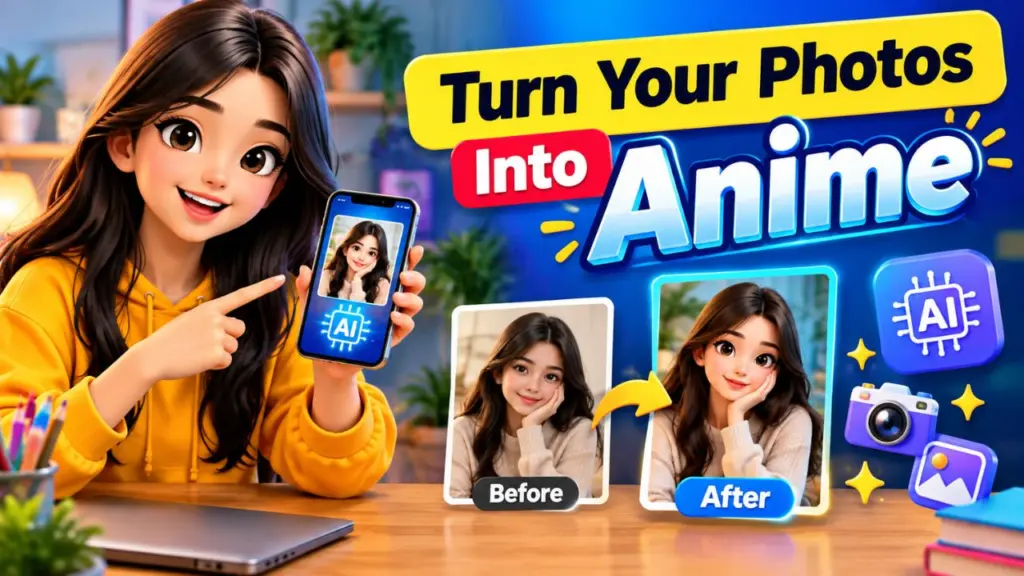
Turn Your Photos Into Anime: Scroll through Instagram for five minutes and you will see it: friends, creators and even your favourite local café turned into glossy 3D cartoon characters or beautifully shaded anime heroes. Big expressive eyes, soft cinematic lighting, dreamy backgrounds, and a look that feels like a frame from an animated movie. These images get saves, shares and follows because they are instantly eye-catching and deeply personal.

The good news is that you do not need to be an illustrator or own expensive software to make them. All you need is a clear photo, the right AI tool, and a well-written prompt. This guide gives you everything in one place: how the trend works, which tools to use, a simple formula for writing prompts, more than 40 copy-paste prompts, fixes for common problems, and a posting strategy to help your transformations reach more people.

Let's turn your photos into anime and 3D cartoons.

What Is the 3D Cartoon and Anime AI Photo Trend?

The trend is simple. You upload a real photo of yourself, a friend, a couple, a pet or a family group, and an AI image model redraws it in a stylised animated look. There are two main flavours.

3D cartoon style gives you smooth, rounded features, soft plastic-like skin, oversized expressive eyes, vibrant colours and cinematic lighting. Think of the polished look of modern animated feature films. It feels friendly, warm and playful, which is why it works so well for profile pictures, birthday posts and family photos.

Anime style uses hand-drawn aesthetics: clean line art, cel shading, dramatic skies, sparkling highlights in the eyes, and painterly backgrounds. It ranges from soft romantic slice-of-life scenes to high-energy action poses. It suits travel photos, couple shoots, fashion posts and aesthetic feeds.

Both styles share the same core idea: keep the person recognisable, but translate them into a world that feels like fiction. When the likeness is right and the styling is strong, the result feels magical, and viewers immediately want to try it themselves. That "I want that too" reaction is exactly what fuels the trend.

Why These Prompts Go Viral on Instagram

Understanding why the trend spreads helps you make posts that perform better.

1. It is instantly recognisable in a feed. Animated visuals stand out against ordinary photography. A bright 3D portrait stops the thumb in a way a standard selfie often does not.

2. It is highly personal. People engage more with content that features real faces. When your followers see you reimagined as a character, they comment, tag friends and ask how you did it.

3. It is easy to replicate. Because the whole process is a photo plus a prompt, followers can copy it in minutes. Creators who share their prompts gain saves, which is one of the strongest signals for Instagram's recommendation system.

4. It fits every niche. Fitness coaches, wedding photographers, travel bloggers, bakers, musicians and students can all adapt the look to their own brand.

5. It supports carousels and Reels. A before-and-after carousel, a swipe reveal, or a short Reel showing the transformation all drive watch time and shares.

If you want your anime and 3D cartoon posts to travel further, pair a strong visual with a clear hook, a useful caption, and a prompt people can actually copy.

Best AI Tools to Turn Photos Into Anime and 3D Cartoons

Many tools can do image-to-image transformations. Features and pricing change often, so check each tool's current plan before committing. Here are the categories that matter.

Chat-based image generators. Several AI assistants now let you upload a photo and describe the transformation in plain language. These are the easiest to start with because you can refine results conversationally: "make the eyes slightly smaller" or "change the background to a sunset."

Dedicated image models. Platforms built around image generation usually offer more control over style strength, aspect ratio and reference images. They are ideal when you want consistent characters across several posts.

Mobile photo-editing apps with AI filters. Many apps include one-tap anime and cartoon effects. They are fast and convenient, though you get less control than with a prompt-based tool.

Open-source and advanced workflows. If you are technical, local image models with face-reference tools can preserve likeness very well. This route takes more setup but gives you the most flexibility.

How to choose: If you are a beginner, start with a chat-based generator that accepts photo uploads. If you want a consistent brand mascot, use a tool with reference-image or character-consistency features. If you only need a quick profile picture, a mobile app filter may be enough.

Whichever tool you pick, the prompts in this guide are written to be tool-agnostic. You may need to tweak wording slightly, but the structure works almost everywhere.

The Simple Formula for Writing a Perfect Anime or 3D Cartoon Prompt

Most weak results come from vague prompts such as "make me anime." A stronger prompt tells the AI exactly what to keep and what to change. Use this seven-part formula:

Subject + Likeness instruction + Style + Expression/Pose + Lighting + Background + Quality tags

Here is what each part does.

Subject. Who or what is in the photo: "a young woman," "a couple," "a golden retriever."

Likeness instruction. Tell the AI to preserve identity: "keep the same face shape, hairstyle, skin tone and outfit."

Style. Name the look: "3D animated movie style," "soft cel-shaded anime," "stylised vinyl toy figure."

Expression and pose. "Warm smile, head tilted slightly, waving at the camera."

Lighting. "Soft golden-hour glow," "cinematic rim lighting," "neon city reflections."

Background. "Pastel dreamy sky," "cosy café interior," "cherry blossom street."

Quality tags. "High detail, sharp focus, clean edges, vibrant colours, 4K, Instagram portrait."

Master template (copy and customise):

Transform this photo into a [STYLE] portrait. Keep the same face shape, hairstyle, skin tone, and outfit so the person stays recognisable. [EXPRESSION AND POSE]. [LIGHTING]. Background: [BACKGROUND]. High detail, clean edges, vibrant colours, sharp focus, vertical 4:5 Instagram format.

Once you understand this skeleton, you can create unlimited variations simply by swapping the bracketed parts.

How to Prepare Your Photo for the Best Results

The AI can only work with what you give it. A few small choices in your source photo dramatically improve the final image.

Use a clear, front-facing photo. The face should be well lit and fully visible. Side angles work, but front or three-quarter views preserve likeness best.

Avoid heavy filters. Beauty filters distort facial structure, and the AI may exaggerate those distortions. Start with a natural photo.

Choose good lighting. Soft daylight near a window is ideal. Harsh shadows across the face can confuse the model and produce uneven shading.

Keep the background simple. A plain or lightly textured background lets the AI focus on the subject and redesign the scene cleanly.

Use high resolution. A sharp image gives the model more detail to interpret, especially for eyes, hair strands and jewellery.

Remove obstructions. Sunglasses, masks, hands covering the face and strong hats reduce accuracy. If the accessory is important, mention it directly in your prompt.

Crop for the final format. If you plan to post on Instagram, crop your source photo to a vertical 4:5 or 9:16 shape so the composition fits naturally.

Spending thirty seconds on photo prep can save you ten failed generations.

15 Best 3D Cartoon AI Prompts for Instagram (Copy-Paste)

Replace anything in brackets with your own details. Always attach your photo first.

Classic and Portrait Prompts

1. The Signature 3D Portrait

Transform this photo into a polished 3D animated movie character portrait. Keep the same face shape, hairstyle, skin tone and outfit. Large expressive eyes, soft smooth skin, warm friendly smile. Soft cinematic lighting with gentle rim light. Pastel gradient background. High detail, vibrant colours, vertical 4:5.

2. Golden Hour Glow

Turn this photo into a 3D cartoon character standing in warm golden-hour sunlight, glowing hair highlights, soft lens flare, relaxed happy expression. Keep facial features and outfit recognisable. Dreamy blurred park background, cinematic depth of field, ultra detailed.

3. Cosy Café Character

Re-imagine this photo as a 3D animated character sitting in a cosy café with a latte, warm lamp lighting, wooden textures and steam rising from the cup. Preserve the face, hairstyle and clothing. Friendly smile, soft shadows, rich warm colours.

4. Vinyl Toy Figure

Convert this photo into a stylised 3D vinyl collectible toy figure with a slightly oversized head, glossy finish and clean studio backdrop. Keep hair colour, skin tone and outfit details. Soft studio lighting, product-photo look, sharp focus.

5. Clay Animation Look

Transform this photo into a handcrafted clay-animation character with visible soft fingerprints in the texture, rounded shapes, warm lighting and a miniature set background. Keep the person recognisable.

Fashion and Lifestyle Prompts

6. Streetwear Hero

Turn this photo into a 3D cartoon streetwear model posing confidently on a graffiti wall at dusk. Keep the face and outfit accurate but stylised. Neon accent lighting, bold colours, cinematic wide-angle feel.

7. Luxury Fashion Editorial

Create a 3D animated fashion editorial portrait from this photo. Elegant pose, glossy hair, detailed fabric textures, soft studio lighting, minimal pastel backdrop. Keep likeness and outfit colours.

8. Gym and Fitness Character

Transform this photo into an energetic 3D cartoon athlete in a bright modern gym, confident pose, subtle motion lines, dramatic lighting. Preserve face and body proportions in a flattering stylised way.

9. Birthday Celebration

Turn this photo into a joyful 3D cartoon birthday portrait with floating balloons, confetti, a small cake and warm party lights. Keep the same face and outfit. Big smile, bright colours, festive mood.

10. Graduation Day

Convert this photo into a proud 3D animated graduate holding a diploma, wearing a cap and gown, with a soft campus background and golden sunlight. Maintain facial likeness.

Couple, Family and Pet Prompts

11. Romantic Couple Scene

Transform this couple photo into a 3D animated movie scene: two characters holding hands under string lights at twilight, soft glowing atmosphere, tender expressions. Keep each person's face, hairstyle and clothing recognisable.

12. Family Portrait

Turn this family photo into a warm 3D cartoon family portrait in a sunny living room. Keep every person's features, ages and outfits distinct. Cheerful expressions, soft light, rich colours.

13. Best Friends Duo

Re-imagine this photo of two friends as playful 3D cartoon characters laughing together at a carnival, colourful lights behind them. Keep both faces and outfits recognisable.

14. Pet Companion

Convert this pet photo into an adorable 3D animated character with expressive eyes and soft fur texture, sitting in a sunny garden. Keep the same fur colour and markings. Cinematic soft lighting.

15. Person and Pet Combo

Transform this photo of me and my pet into a heartwarming 3D animated duo on a cosy sofa, warm evening light, matching happy expressions. Preserve both likenesses.

12 Best Anime AI Prompts to Turn Your Photo Into a Hero

Anime prompts benefit from naming the shading style, line quality and atmosphere. These work for portraits, travel photos and couple shots.

16. Soft Slice-of-Life Anime

Turn this photo into a soft slice-of-life anime illustration with clean line art, gentle cel shading, large sparkling eyes and pastel colours. Keep the same hairstyle and outfit. Warm afternoon sunlight, calm everyday mood.

17. Cherry Blossom Dream

Redraw this photo as an anime character standing under falling cherry blossoms, wind moving the hair gently, soft pink sky, detailed painterly background, delicate highlights. Keep the face recognisable.

18. Rainy Night Neon City

Transform this photo into an anime character walking through a rainy neon city at night, reflective puddles, glowing signs, moody cinematic lighting, detailed line art. Preserve face, hair and outfit.

19. Epic Action Pose

Convert this photo into a dynamic anime action scene with a dramatic low-angle pose, flowing clothing, speed lines and a stormy sky. Keep the character's face and hairstyle consistent. Bold colours, sharp shading.

20. Fantasy Adventurer

Turn this photo into an anime fantasy adventurer with a travelling cloak, glowing magical particles and a mountain landscape at sunrise. Maintain facial likeness and hair colour.

21. School Rooftop Sunset

Re-imagine this photo as an anime character on a school rooftop at sunset, breeze in the hair, orange and purple sky, nostalgic feeling, detailed clouds. Keep likeness.

22. Romantic Anime Couple

Transform this couple photo into a romantic anime scene under a starry sky, soft lantern glow, gentle smiles, delicate shading. Keep both faces, hairstyles and outfits recognisable.

23. Traditional Festive Look

Turn this photo into an anime portrait wearing traditional festive clothing, with glowing lamps and decorations in the background, warm golden lighting, elegant detail in fabric patterns. Keep the face recognisable.

24. Cyberpunk Anime

Convert this photo into a cyberpunk anime character with subtle glowing accessories, futuristic city skyline, purple and cyan lighting, crisp line art. Preserve face and hairstyle.

25. Dreamy Sky Portrait

Redraw this photo as a dreamy anime portrait with an enormous cloud-filled sky, soft light rays, floating petals and luminous eyes. Keep the same hairstyle and outfit.

26. Travel Memory Anime

Transform this travel photo into an anime scene that keeps the landmark and pose but redraws everything in painterly anime style, vivid sky, detailed architecture, warm light.

27. Chibi Mini Me

Turn this photo into a cute chibi anime version with a small body and big head, simple clean outlines, bright colours, sticker-style white border and a pastel background. Keep hair, outfit colours and accessories.

Creative Style Variations to Make Your Feed Stand Out

If everyone is posting the same look, a unique twist helps you stand out. Try swapping the style line in the master template with one of these.

Watercolour anime: soft bleeding colours, paper texture, delicate ink outlines.

Retro 90s anime: slightly grainy film look, muted palette, classic cel shading.

Glossy 3D emoji: a rounded, sticker-like character with exaggerated expression.

Isometric mini-world: the person standing inside a tiny diorama of their favourite place.

Storybook illustration: warm hand-painted textures and gentle fairytale lighting.

Paper-craft cutout: layered paper shapes with subtle shadows.

Holographic futuristic: shiny iridescent surfaces and neon edges.

Low-poly 3D: geometric faceted shapes for a modern game-art aesthetic.

You can also combine two styles, for example "3D cartoon character with watercolour background" or "anime portrait inside an isometric room." Experimentation is where signature looks are born.

Prompt Add-Ons That Instantly Improve Quality

Think of these as optional boosters you can append to any prompt.

For better likeness: "Preserve the exact facial structure, eye shape, nose, lips, hairline and skin tone from the reference photo."

For cleaner details: "Sharp focus, clean edges, no blur, no distortion, symmetrical eyes, natural hands."

For richer lighting: "Cinematic lighting, soft rim light, volumetric glow, subtle bokeh."

For Instagram readiness: "Vertical 4:5 composition, subject centred with space around the head, social-media ready."

For emotion: "Warm genuine smile," "playful wink," "calm dreamy gaze," "excited laugh."

For stronger colour: "Vibrant but balanced colour palette, rich contrast, no oversaturation."

If your tool supports negative prompts, add: "extra fingers, distorted face, blurry, low resolution, uneven eyes, watermark, text, cropped head." If it does not, you can phrase the same idea positively, such as "natural hands with five fingers, clear detailed face."

Common Problems and How to Fix Them

Even strong prompts sometimes produce imperfect images. Here are the most frequent issues and quick solutions.

The face does not look like me. Add a stronger likeness instruction and mention specific features: "same round face, thick eyebrows, small mole on left cheek, shoulder-length wavy hair." Use a clearer front-facing photo and reduce style strength if your tool offers a slider.

The eyes look strange. Ask for "symmetrical, natural-sized eyes with realistic proportions." In anime style, you may also request "moderately large eyes" to avoid over-exaggeration.

Hands look wrong. Hide the hands in the pose ("hands in pockets," "holding a cup close to the chest") or crop above the waist.

The style is too realistic. Add stronger style words: "clearly illustrated, stylised animation, not photorealistic."

The result is too cartoonish and loses identity. Lower the style intensity, or write "subtle stylisation, semi-realistic 3D animation."

Text in the image is garbled. Avoid asking for text inside the image. Add captions later in an editing app such as Canva.

The outfit changed unexpectedly. Add "keep exact outfit colours and design" and describe the clothing in detail.

Backgrounds look messy. Specify one clear setting and avoid listing too many elements. Simple backgrounds look more professional.

Treat each generation as a draft. Small wording changes between attempts often make a big difference.

How to Post Your AI Anime and 3D Cartoon Images on Instagram

A beautiful image deserves a smart posting plan. These formats work especially well.

Before-and-after carousel. Slide one shows your original photo, slide two shows the transformation, and slide three offers the prompt. This format earns saves and shares because it delivers clear value.

Reveal Reel. Show your original photo for one second, add a quick transition, then reveal the animated version with trending audio. Keep it under fifteen seconds.

Prompt breakdown carousel. Show the final image first, then explain each part of the prompt on separate slides. Educational posts perform well with creators and small businesses.

Character series. Post the same character in different scenes, such as café, beach, festival and city night. A series encourages followers to return.

Story polls. Ask followers to vote between two styles ("3D cartoon or anime?") and use the winner for your next post.

Profile avatar update. A fresh animated profile picture is a simple way to refresh your brand and prompt conversation in your DMs.

Post at times when your audience is most active, check your Insights, and reply to comments quickly in the first hour.

Instagram Caption Ideas and Hashtags

A good caption gives context and invites interaction.

Caption examples:

"Turned myself into a cartoon character and honestly, I'm obsessed. Want the prompt? Save this post."

"Real life vs. animated life. Which one wins?"

"If my life were an animated movie, this would be the poster."

"Anime me looks cooler than real me. Comment 'PROMPT' and I'll share it."

"Swipe to see the transformation, then try it with your own photo."

"Main character energy, animated edition."

Hashtag ideas (mix broad and niche, and keep to a relevant handful):

#AIArt #AnimeArt #3DCartoon #AIPortrait #CartoonAvatar #AnimeStyle #InstagramTrend #AIPrompts #DigitalArt #CartoonMe #AnimeEdit #CreativeAI #AIPhotoEditing

Place a clear call to action in your caption, such as "Save this for later" or "Tag a friend who needs this." Engagement signals help your post reach new viewers.

Mistakes to Avoid When Creating AI Anime Photos

Using low-quality source photos. Blurry images produce blurry characters.

Writing overly long, chaotic prompts. Too many instructions can confuse the model. Keep your prompt focused on one style, one setting and one mood.

Ignoring aspect ratio. An image generated in the wrong shape may be cropped awkwardly on Instagram.

Posting every result. Choose your best one or two images. Quality builds a stronger feed than quantity.

Forgetting a consistent style. If you want a recognisable brand, repeat the same style words, colour palette and lighting across posts.

Skipping disclosure when needed. If you run a business, be transparent that visuals are AI-generated, especially in sponsored content.

Over-editing the face. Heavy beautification can strip away what makes you look like you, and followers often prefer authentic charm.

Privacy, Ethics and Responsible Use

AI image tools are fun, but a few responsible habits keep you safe and respectful.

Be careful with personal photos. Read the privacy policy of any tool you upload to. Understand whether images may be stored or used for training, and avoid uploading sensitive or private photos.

Get permission before using other people's faces. Never transform a friend's, colleague's or stranger's photo for public posting without their consent. This matters even more for children, so be cautious about posting images of minors.

Do not impersonate real people. Avoid creating misleading content that could be mistaken for the real person in a damaging context.

Respect copyright. Describe styles in general terms such as "3D animated movie style" or "cel-shaded anime," and avoid asking for copyrighted characters or brand logos if you plan to use the image commercially.

Check commercial terms. If you use the image for business, confirm the tool's licence allows commercial use.

Label AI content where appropriate. Instagram offers AI labelling options, and clear disclosure builds trust with your audience.

Responsible creators earn longer-lasting audiences.

Pro Tips for Consistent Characters and Better Results

Save your best prompts. Keep a notes file of prompts that worked, along with the photo type used. This becomes your personal prompt library.

Iterate in small steps. Change one element at a time, such as lighting or background, so you learn what each change does.

Use reference images. If your tool supports multiple references, add one for likeness and another for style.

Fix the seed or reuse the same session. Some tools allow a fixed seed or conversation continuity, which helps keep a character consistent across scenes.

Describe your signature details. Glasses, a beard, curly hair, a favourite jacket or a unique accessory help anchor identity.

Upscale and polish. After generating, use an upscaler to sharpen details, then do light colour correction in an editing app.

Match the mood to the occasion. Warm tones suit birthdays and family posts, cool neon suits night scenes, and pastel palettes suit romantic content.

Study what performs. Check your Instagram Insights for saves and shares, then create more of what your audience loves.

Frequently Asked Questions

How do I turn my photo into anime for free?

Many AI tools offer free daily credits or limited free tiers. Upload a clear photo, paste an anime prompt from this guide, and generate. Free plans may include watermarks or lower resolution, so check each tool's current limits.

What is the best prompt for a 3D cartoon profile picture?

Use the Signature 3D Portrait prompt (Prompt 1). It asks for a polished animated style, preserves your features and uses soft lighting, which makes it ideal for a profile photo.

Why does my AI cartoon not look like me?

Usually the source photo is unclear or the prompt lacks likeness instructions. Use a front-facing, well-lit photo and add details such as face shape, hairstyle and distinctive features.

Can I use these prompts for couples and family photos?

Yes. Prompts 11 to 13 are designed for couples, families and friends. Be sure to describe each person's key features so the AI keeps everyone distinct.

Can I use AI cartoon images commercially?

It depends on the tool's licence and the content you create. Read the terms of service before using images in ads, products or client work.

What aspect ratio is best for Instagram?

Vertical 4:5 works well for feed posts, and 9:16 is best for Reels and Stories.

How many prompts should I try before choosing a final image?

Most creators generate five to ten variations. Pick the one with the best likeness, cleanest details and strongest emotional expression.

Will the AI keep my outfit the same?

Only if you instruct it to. Add phrases like "keep the exact outfit design and colours" and describe the clothing clearly.

Final Thoughts

Turning your photos into anime and 3D cartoons is one of the most enjoyable and shareable creative trends on Instagram right now. With a clear source photo, a smart prompt formula and a little experimentation, you can produce portraits that look like stills from an animated film, without any drawing skill.

Start with the master template, try a few of the 40-plus prompts above, and adjust the style, lighting and background until the result feels like you. Save your favourite prompts, post with a strong hook, and invite your audience to try the trend for themselves.

Ready to begin? Pick one prompt from this guide, upload your best photo, and create your first animated version today. Your feed is about to look a lot more magical.

Tip: Bookmark this guide and revisit it whenever you need fresh prompt ideas, caption inspiration or troubleshooting tips for your next AI transformation.
 ChatGPT
 ChatGPT
 ChatGPT
 ChatGPT