12 Trending Birthday AI Photo Editing Prompts for 2026 (Copy-Paste Face Swap Prompts for a 100% Real Look)
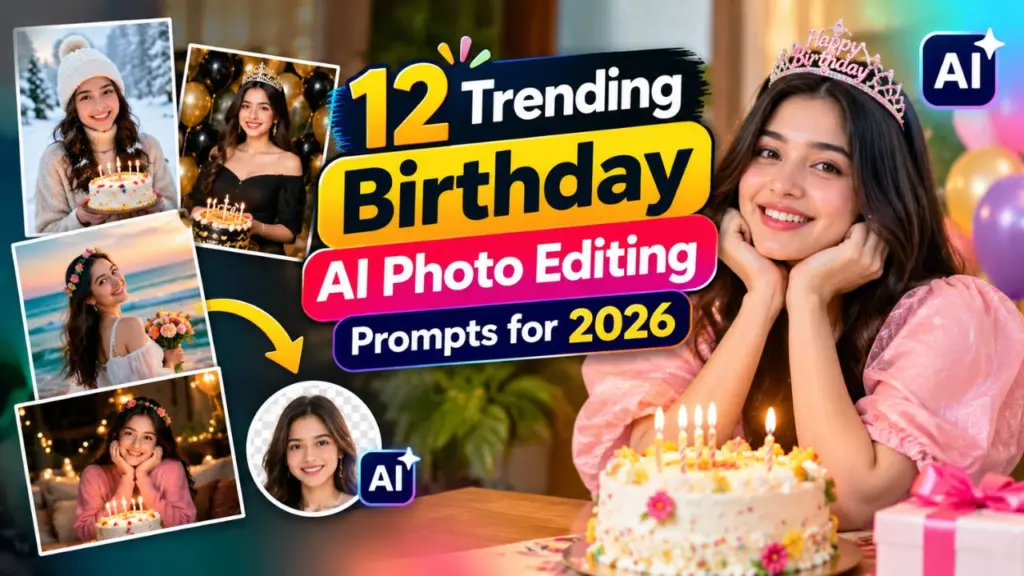
12 Trending Birthday AI Photo Editing Prompts for 2026: Birthdays used to mean one blurry photo with a cake. In 2026, they mean cinematic portraits, dreamy balloon backdrops, luxury party scenes and magazine-style cover shots, all created from a single selfie.
AI image tools have become so advanced that anyone can now turn an ordinary photo into a studio-quality birthday portrait in under a minute. The secret is not the tool. It is the prompt.
In this guide you will get 12 trending, copy-paste birthday AI photo editing prompts, a proven prompt formula, face swap tips for a natural and realistic result, the best tools to use, common mistakes to avoid and a short FAQ. Whether you are editing your own birthday photo, a friend’s, or a gift for a loved one, this article will help you get results that look real, not “AI-generated.”
What Are Birthday AI Photo Editing Prompts?
A birthday AI photo editing prompt is a written instruction you give to an AI image generator or editor to transform your photo into a birthday-themed image. Instead of using sliders and filters, you simply describe what you want:
- The scene (rooftop party, garden, neon club, luxury penthouse)
- The outfit (formal, ethnic, casual, vintage)
- The lighting (golden hour, soft studio light, candlelight)
- The mood (elegant, fun, cinematic, dreamy)
- The details (balloons, cake, confetti, fairy lights, banners)
When you upload your own photo along with the prompt, the AI keeps your face and style while rebuilding everything around you.
Best AI Tools for Birthday Photo Editing in 2026
You do not need expensive software. These popular tools work well with the prompts in this guide:
- Google Gemini (image editing): Great at keeping facial features consistent with natural lighting.
- ChatGPT image generation: Strong at following long, detailed instructions and text on cakes or banners.
- Midjourney: Best for artistic, cinematic and highly stylized birthday scenes.
- Adobe Firefly: Clean, commercially safe results and excellent background replacement.
- Canva AI tools: Easy for beginners who also want to add text, frames and layouts.
- Leonardo AI and similar editors: Good for stylized portraits and creative variations.
Tool features change quickly, so check each app for its latest options. The prompts below are written to work across most of them.
How to Prepare Your Photo for a 100% Real Look
The quality of your input decides the quality of your output. Before using any prompt, follow these steps:
- Use a high-resolution photo. Avoid compressed screenshots or heavily filtered selfies.
- Choose a clear, front-facing image. Both eyes, the nose and the mouth should be fully visible.
- Pick good lighting. Natural daylight or soft indoor light gives the AI more accurate skin texture.
- Avoid sunglasses, masks or heavy shadows across the face.
- Keep a neutral or slight smile. Extreme expressions are harder to reproduce naturally.
- Upload a second reference image if needed. A side-angle photo helps the AI maintain facial structure.
The Golden Formula for a Perfect Birthday Prompt
Every great prompt follows a simple structure. Use this formula and customize it:
[Subject] + [Outfit] + [Scene] + [Lighting] + [Camera Style] + [Mood] + [Realism Instructions]
Example:
A young woman in an elegant pastel dress, standing in a rooftop birthday party with string lights and soft pink balloons, golden hour lighting, shot on 85mm lens, shallow depth of field, cheerful and cinematic mood, ultra-realistic skin texture, natural details.
The realism instructions at the end matter most. Phrases like “natural skin texture,” “visible pores,” “no plastic look” and “realistic proportions” push the AI away from the over-smoothed, artificial finish.
Prompt 1: Golden Hour Balloon Portrait
Best for: Instagram profile pictures and birthday posts.
Edit the uploaded photo. Keep my face, hairstyle and facial features exactly the same. Place me in an outdoor garden birthday setup during golden hour, surrounded by soft pastel balloons in peach, cream and gold. Warm sunlight glowing on my hair, shallow depth of field, shot on 85mm lens, natural skin texture with visible pores, soft smile, ultra-realistic, high-resolution photography.Prompt 2: Luxury Rooftop Birthday Party
Best for: A premium, celebrity-style look.
Transform the uploaded photo into a luxury rooftop birthday party at night. I am wearing a tailored black outfit, standing near a glowing city skyline with warm string lights, a small elegant cake on a table and champagne-colored balloons in the background. Cinematic lighting, realistic reflections, sharp focus on my face, natural skin tones, professional event photography, 4K realism.Prompt 3: Cinematic Cake Cutting Moment
Best for: Candid and emotional birthday shots.
Create a cinematic photo of me about to blow out candles on a handmade birthday cake. Candlelight reflecting softly on my face, dark cozy room background with blurred fairy lights, warm tones, close-up portrait, realistic skin texture, natural expression, preserve my exact face from the uploaded photo, film-style grain, 50mm lens.Prompt 4: Neon Night Party Portrait
Best for: Young, trendy and bold edits.
Edit this photo into a neon birthday night portrait. Keep my face and identity unchanged. Pink and blue neon lights on both sides of my face, glossy balloons in the background, a subtle "Happy Birthday" neon sign behind me, confetti in the air, modern streetwear outfit, high contrast, sharp details, realistic reflections on skin, professional night photography.Prompt 5: Traditional Ethnic Birthday Look
Best for: Indian and South Asian celebrations, festive family photos.
Transform the uploaded photo into a traditional birthday celebration. I am wearing an elegant ethnic outfit with subtle gold embroidery, standing in a decorated home setup with marigold flowers, diyas, soft yellow lighting and a beautifully decorated cake. Keep my face exactly the same, realistic fabric texture, warm festive mood, natural skin tones, high-quality portrait photography.Prompt 6: Dreamy Pastel Studio Shoot
Best for: Clean, minimal and aesthetic birthday photoshoots.
Create a pastel studio birthday photoshoot using my uploaded photo. Soft lilac backdrop, floating balloons, a small cake on a pedestal, minimal props, soft diffused studio lighting, smooth but realistic skin (keep natural texture, no plastic effect), fashion-magazine composition, preserve my facial identity, 8K detail.Prompt 7: Vintage Film Birthday Photo
Best for: Retro and nostalgic aesthetics.
Turn the uploaded photo into a vintage 1990s-style birthday photograph. Keep my face the same. Warm film tones, slight grain, handheld disposable-camera look, party hats, paper streamers, a homemade cake on a wooden table, soft flash lighting, realistic imperfections, authentic nostalgic mood.Prompt 8: Magazine Cover Birthday Edition
Best for: A fun, bold and shareable result.
Create a glossy magazine cover using my uploaded photo as the main subject. Title text: "BIRTHDAY EDITION 2026". I am wearing a stylish outfit with confetti and balloons around me, studio lighting, sharp editorial look, clean typography, realistic skin and hair detail, keep my face and features exactly as in the original photo.Prompt 9: Couple or Best Friend Birthday Face Swap
Best for: Group shots and gifts. Only use photos of people who have agreed to it.
Use Image 1 (reference face) and Image 2 (birthday scene). Place the face from Image 1 onto the person in Image 2 with accurate skin tone matching, correct head angle, matching lighting direction and natural neck and hairline blending. Preserve the facial features, eye shape and expression of the reference as closely as possible. Keep the original background, outfit and body pose of Image 2 untouched. Photorealistic result, no visible edges or distortion.Prompt 10: Kids Birthday Theme Party
Best for: Parents making a lovely keepsake of their own child.
Edit the uploaded photo of my child into a cheerful birthday party scene with colorful balloons, a cartoon-style cake, party hats and soft natural light. Keep the child's face, hairstyle and expression exactly the same. Bright, warm, friendly colors, realistic photo style, no distortion, clean and age-appropriate image.Prompt 11: Cozy Candlelit Dinner Birthday
Best for: Romantic and intimate celebration photos.
Transform the uploaded photo into a cozy candlelit birthday dinner. I am seated at a beautifully decorated table with soft candles, roses, a small cake and warm bokeh lights in the background. Elegant outfit, warm cinematic lighting, shallow depth of field, preserve my exact face and features, realistic skin texture, 50mm lens look.Prompt 12: Beach Sunset Birthday Celebration
Best for: Travel lovers and summer birthdays.
Place me in a beach sunset birthday celebration, using the uploaded photo as the face and identity reference. Light summer outfit, a small decorated cake on a picnic setup, balloons tied to wooden poles, gentle waves, orange and pink sky, wind-blown hair, natural expression, realistic lighting on skin, travel-photography style, high resolution.Pro Tips for a Natural, 100% Real Face Swap Look
A realistic face swap is less about the tool and more about small details. Keep these in mind:
- Match the lighting direction. If the scene is lit from the left, your reference photo should be too.
- Match skin tone and temperature. Ask the AI to “match skin tone and color temperature to the scene.”
- Match head angle. A front-facing photo works best on a front-facing body.
- Keep the hairline natural. Add “natural hairline blending” to your prompt.
- Avoid over-smoothing. Add “visible pores, natural skin texture, no beauty filter.”
- Ask for imperfections. Subtle asymmetry and tiny flyaway hairs make images feel human.
- Generate several versions. Pick the most natural one instead of settling for the first result.
- Refine in steps. If the first image is close, ask for small changes such as “make the smile softer” or “reduce the glow on the forehead.”
Words That Make Your Prompts Look More Realistic
Add a few of these to the end of any prompt:
- natural skin texture, visible pores
- photorealistic, ultra-detailed, 4K, 8K
- shot on 50mm or 85mm lens
- shallow depth of field, soft bokeh
- soft natural lighting, golden hour glow
- realistic shadows and reflections
- film grain, true-to-life colors
- no plastic skin, no over-smoothing, no distortion
Common Mistakes to Avoid
- Writing vague prompts. “Make it a birthday photo” gives random results. Be specific about scene, outfit and light.
- Using low-quality input photos. Blurry or filtered images create warped faces.
- Ignoring lighting. Mismatched lighting is the number one giveaway of a fake edit.
- Over-prompting. Too many conflicting styles confuse the model. Stick to one clear theme.
- Over-editing the face. The more you push “perfect skin,” the less real it looks.
- Skipping the review. Always check hands, teeth, ears and text on cakes or banners for errors.
Use AI Face Swap Responsibly
Face swap technology is powerful, so use it with care:
- Only use photos of yourself, or of people who have clearly given permission.
- Never create images meant to mislead, harass or impersonate someone.
- Be careful with photos of children, and only edit your own child’s photos for personal keepsakes.
- Avoid uploading sensitive photos to apps you do not trust. Read the privacy policy first.
- Consider labeling heavily edited or generated images when you share them publicly.
Responsible use keeps AI creative, fun and safe for everyone.
Frequently Asked Questions (FAQs)
Are these birthday AI prompts free to use? Yes. You can copy and paste them into any compatible AI image tool. Some tools may limit free image generations, so check each platform’s plan.
Which AI tool gives the most realistic results? It depends on your goal. Gemini and ChatGPT are excellent for keeping a face consistent, while Midjourney shines for artistic, cinematic scenes. Test the same prompt in two tools and compare.
How do I stop the AI from changing my face? Add lines like “preserve my exact face, facial features and hairstyle” and upload a clear, high-quality reference photo. Avoid changing too many elements at once.
Can I use these prompts for a boy or a girl? Absolutely. Simply adjust the outfit, hairstyle and styling words to suit the person in the photo.
Why does my AI image still look fake? Common causes are low-quality input photos, mismatched lighting and over-smoothing. Add realism keywords and regenerate a few times.
Can I edit group photos with these prompts? Yes, but results are better when you edit one person at a time or upload clear photos for each person involved.
Is face swapping legal and safe? It is generally fine for personal, consensual use. Laws vary by country, and using someone’s face without permission or to deceive others can cause legal and ethical problems.
Conclusion: Create Your Best Birthday Photo Yet
The best birthday AI photos in 2026 come from three things: a clear photo, a detailed prompt and a few smart refinements. Start with one of the 12 prompts above, tweak the outfit, location and mood to fit your personality, and add realism keywords to keep the result natural.
Save this guide, try two or three prompts, and compare the results. You will quickly find the style that suits you best. Happy birthday, and happy editing!
Disclaimer: AI tools and their features change frequently. Results vary by tool, photo quality and prompt wording. Always use photos responsibly and with permission.