5+ Best Halloween AI Photo Prompts for Men 2026: Hyper-Realistic Looks
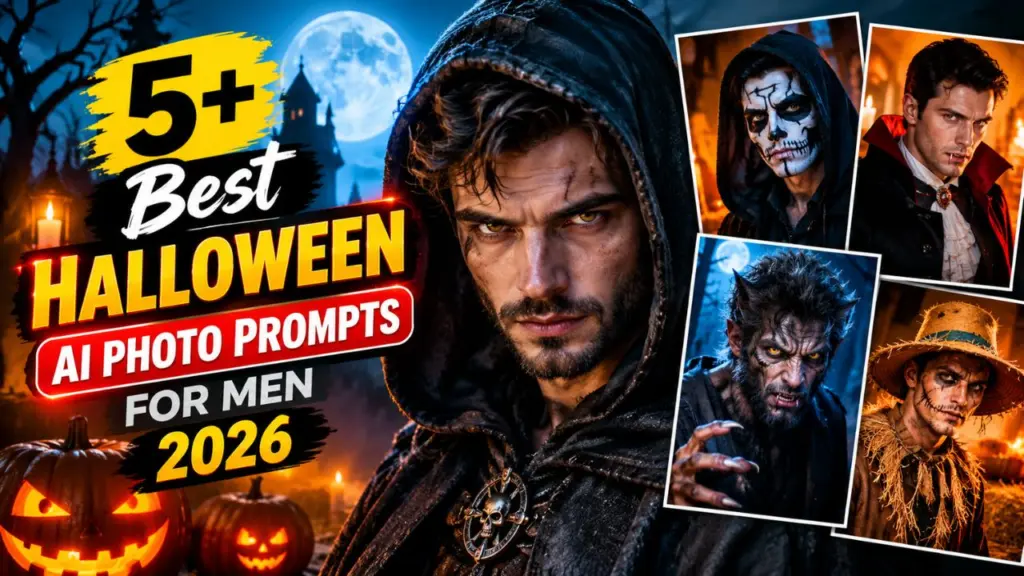
5+ Best Halloween AI Photo Prompts for Men 2026: Halloween has moved far beyond store-bought masks and face paint. In 2026, millions of men are turning their selfies into cinematic, horror-movie-quality portraits using AI image tools. The reason is simple: AI delivers studio-level special effects, dramatic lighting, and film-grade realism in seconds, with no makeup artist, no costume budget, and no photographer.
Whether you want a new Instagram profile picture, a spooky WhatsApp display photo, a party invitation graphic, or just a few unforgettable images to share with friends, a well-written prompt makes all the difference. A vague prompt like “scary man Halloween” gives you a flat, cartoonish result. A detailed prompt with lens, lighting, texture, and mood gives you a photo that looks like a still from a big-budget horror film.
This guide gives you 7 tested, copy-paste Halloween AI photo prompts for men, plus the exact formula behind them so you can build your own.
What Makes an AI Photo “Hyper-Realistic”?
Before the prompts, it helps to understand what separates a believable image from an obviously fake one. Hyper-realism in AI photography comes down to six elements:
- Skin and texture detail: pores, stubble, scars, sweat, dirt, and fine wrinkles. Perfectly smooth skin is the biggest giveaway of an AI image.
- Real camera language: lens focal length, aperture, and film style (for example, “85mm lens, f/1.8, shallow depth of field”).
- Cinematic lighting: rim light, moonlight, candle glow, fog diffusion, or harsh single-source shadows.
- Atmosphere: mist, drifting embers, dust particles, cold breath, wet pavement.
- Believable imperfections: asymmetry, flyaway hair, torn fabric, uneven makeup.
- Color grading: a controlled palette such as teal and orange, desaturated cold tones, or deep amber.
Every prompt below uses these principles.
The Master Prompt Formula for Halloween AI Portraits
Use this simple structure to build your own prompts:
[Subject and age] + [Costume or transformation] + [Face and skin details] + [Setting] + [Lighting] + [Camera and lens] + [Mood and color grade] + [Quality keywords]
Example: “A 30-year-old man with short dark hair and light stubble, transformed into a vampire, pale skin with visible pores, dim candlelit Gothic library, warm side lighting, 85mm lens, f/1.8, moody cinematic color grade, ultra-detailed, photorealistic.”
Keep this formula handy. It works across ChatGPT image generation, Midjourney, Google Gemini, Leonardo AI, Adobe Firefly, and Stable Diffusion.
1. The Gothic Vampire Lord Prompt
This is the timeless classic, and it suits almost every face. It works best for men with strong jawlines or defined cheekbones, and it creates an elegant, dangerous, aristocratic mood.
Copy-paste prompt:
Hyper-realistic cinematic portrait of a 30-year-old man transformed into a gothic vampire lord, pale porcelain skin with visible pores and faint blue veins, sharp cheekbones, subtle fangs, deep crimson eyes with natural reflections, slicked-back dark hair, high-collared black velvet coat with antique silver brooch, standing in a candlelit Victorian castle hall, warm flickering candlelight on one side and cold blue moonlight from a tall window on the other, light mist at floor level, shot on 85mm lens, f/1.8, shallow depth of field, film grain, moody desaturated color grade, ultra-detailed, 8K, photorealisticPro tips:
- Add “natural skin texture, no airbrushing” to avoid a waxy look.
- If the fangs look exaggerated, replace “subtle fangs” with “slightly elongated canines.”
- For a more modern look, swap the velvet coat for a black leather jacket and set the scene on a rainy city rooftop.
2. The Werewolf Transformation Prompt
A mid-transformation werewolf is one of the most shareable Halloween concepts because it tells a story in a single frame. The key is keeping the face recognizable while adding creature features gradually.
Copy-paste prompt:
Hyper-realistic cinematic photo of a rugged 35-year-old man mid-transformation into a werewolf, face still recognizable, thick stubble turning into coarse grey-brown fur along the jaw and neck, glowing amber eyes, veins bulging on the neck, torn dark flannel shirt, dirt and sweat on skin, standing in a dark pine forest under a giant full moon, cold blue moonlight with warm amber rim light, heavy fog, breath visible in cold air, shot on 50mm lens, f/2, dramatic contrast, horror movie color grade, ultra-realistic skin and fur detail, photorealistic, 8KPro tips:
- Use “mid-transformation” rather than “werewolf” alone. Otherwise the AI may replace your entire face with an animal.
- Add “claws beginning to emerge” for extra storytelling.
- For a full creature look, change to “fully transformed werewolf, human eyes.”
3. The Decayed Zombie Survivor Prompt
Zombie looks are perfect for men who want a gritty, dramatic, post-apocalyptic effect. The secret is layered realism: dirt, blood spatter, torn clothing, and a tired, haunted expression rather than a cartoon scream.
Copy-paste prompt:
Ultra-realistic cinematic portrait of a 32-year-old man as a zombie survivor in the early stage of infection, grey-green skin tone, dark sunken eyes with bloodshot whites, cracked lips, dried blood streaks on cheek and neck, realistic wounds with natural texture, torn and dirty denim jacket, messy hair with debris, standing in an abandoned gas station at dusk, flickering neon sign, orange sunset haze mixed with cold green fluorescent light, dust particles in the air, shot on 35mm lens, f/2.8, handheld documentary feel, gritty film grain, post-apocalyptic color grade, photorealistic, 8KPro tips:
- “Early stage of infection” gives a more believable, less over-the-top result.
- Add “subtle makeup effects, practical SFX style” to mimic real horror movie prosthetics.
- Want it more social-media friendly? Remove “dried blood” and use “dirt and bruising.”
4. The Grim Reaper in Fog Prompt
This look is powerful, minimal, and extremely cinematic. It works well even if you do not want heavy face transformation, because the hooded costume does most of the storytelling.
Copy-paste prompt:
Hyper-realistic cinematic portrait of a tall man dressed as the Grim Reaper, long weathered black hooded robe with frayed edges and realistic fabric folds, face half-hidden in deep shadow with pale skin and piercing pale-blue eyes visible, holding an aged wooden scythe with rusted blade, standing in a foggy old graveyard at midnight, moonlight cutting through bare trees, low-lying mist, wet grass, cold desaturated blue-grey color palette, shot on 50mm lens, f/1.8, strong atmospheric depth, film grain, dramatic horror cinematography, ultra-detailed, photorealistic, 8KPro tips:
- Use “face half-hidden in shadow” to keep a mysterious feel while preserving your likeness.
- Add “silhouette against full moon” for a poster-style version.
- Try a red-and-black palette for a more intense mood.
5. The Haunted Scarecrow Prompt
A haunted scarecrow is original, creepy, and very different from the usual vampire and zombie looks, so it helps you stand out in a feed full of similar images. It also pairs beautifully with autumn colors.
Copy-paste prompt:
Hyper-realistic cinematic portrait of a 33-year-old man as a haunted scarecrow, burlap sack texture partially covering the face with stitched mouth lines and cracked skin beneath, one glowing orange eye visible, straw sticking out from collar and sleeves, patched weathered brown coat and torn plaid shirt, standing in a dying cornfield at golden hour dusk, crows on a wooden fence post behind, warm orange backlight with long shadows, floating dust and dried leaves, shot on 85mm lens, f/2, rich autumn color grade, subtle film grain, folk-horror atmosphere, ultra-detailed textures, photorealistic, 8KPro tips:
- Specify “burlap texture, individual fibers visible” for realistic fabric.
- Add “pumpkin patch” in the background for a seasonal touch.
- Great for a Halloween profile photo because the warm colors look good on every platform.
6. The Cursed Pirate Captain Prompt
If you want something adventurous and a little supernatural, a cursed pirate captain is a strong choice. It combines rugged masculine styling with ghostly effects, and it flatters beards and weathered faces.
Copy-paste prompt:
Hyper-realistic cinematic portrait of a 38-year-old rugged man as a cursed ghost pirate captain, sun-weathered skin with deep lines and salt crust, thick dark beard with braids and small bone charms, one eye clouded white, translucent ghostly shimmer along the edges of his shoulders, long tattered navy captain's coat with tarnished brass buttons, wet hair, standing on the deck of a decaying ship at night, green phantom glow from the sea, storm clouds, sea spray, lantern light flickering on his face, shot on 35mm lens, f/2.2, teal and green color grade with warm lantern highlights, epic fantasy horror cinematography, ultra-detailed, photorealistic, 8KPro tips:
- “Translucent shimmer” works better than “transparent,” which can cause missing body parts.
- Add “wet skin, water droplets” for extra realism.
- Swap the ship for a misty harbor if you want a calmer composition.
7. The Modern Slasher Silhouette Prompt
This is a stylish, suspense-driven look inspired by classic slasher cinematography, without copying any specific character. It is perfect for men who prefer a subtle, high-fashion horror style over heavy makeup.
Copy-paste prompt:
Hyper-realistic cinematic photo of a man in a dark hooded jacket and plain pale featureless mask pushed up on his forehead, standing alone at the end of a suburban street on Halloween night, glowing carved pumpkins on porches, flickering streetlights, thin fog, wet asphalt reflecting orange and blue light, one hand holding a flashlight, tense and watchful expression, background slightly blurred, shot on 35mm lens, f/1.8, anamorphic lens flare, cinematic teal and orange color grade, suspense thriller atmosphere, natural skin texture, ultra-detailed, photorealistic, 8KPro tips:
- Keep the mask “plain and featureless” to avoid copyrighted-style results.
- Use “from behind, looking over shoulder” for a more suspenseful angle.
- This look is ideal if you want your face to remain clearly visible.
Bonus: 3 Quick Halloween Prompt Ideas to Try
If you want even more variety, here are short prompt starters you can expand with the master formula:
- Fallen Angel: “Dark winged man with charred feathers, ash falling from the sky, ruined cathedral, golden hour backlight.”
- Skeleton Biker: “Realistic skull face paint on a man in a leather jacket, neon-lit night street, motorcycle in the background, cyberpunk reds and blues.”
- Witch Hunter: “Rugged man in a long coat with a lantern and old crossbow, misty medieval forest, moonlit atmosphere.”
How to Upload Your Own Photo for a Personalized Look
Most modern AI tools let you upload a selfie so the result looks like you. For the best outcome, follow these steps:
- Use a clear, front-facing photo with good lighting and no sunglasses or heavy filters.
- Add an instruction line at the start of your prompt: “Use the uploaded photo as the face reference. Keep my facial structure, skin tone, and hairstyle recognizable.”
- Describe the transformation, not your face. The AI already sees your features, so focus the prompt on costume, setting, and lighting.
- Generate several variations and pick the most natural one.
- Refine step by step. Ask for small changes such as “make the eyes less glowing” or “add more fog” rather than rewriting the whole prompt.
Only upload photos of yourself or people who have given permission, and always review the privacy policy of the tool you use.
Best AI Tools for Halloween Photo Generation in 2026
Different tools have different strengths. Here is a quick guide:
| Tool | Best For | Strength |
|---|---|---|
| ChatGPT image generation | Beginners and quick edits | Easy conversation-style refinement and photo upload |
| Midjourney | Cinematic, artistic realism | Exceptional lighting and atmosphere |
| Google Gemini | Fast photo-based edits | Strong at keeping faces consistent |
| Leonardo AI | Control and presets | Good for character styles and variations |
| Adobe Firefly | Commercial-safe content | Clean results and easy editing |
| Stable Diffusion | Advanced users | Full customization with local control |
Tool features change quickly, so test the same prompt on two or three platforms and compare results.
10 Pro Tips to Make Your Halloween AI Photos Look Real
- Always mention skin texture. Phrases like “visible pores, stubble, natural imperfections” reduce the plastic look.
- Specify a lens. 35mm for gritty realism, 50mm for natural perspective, 85mm for flattering portraits.
- Use one dominant light source. Single-source lighting looks more cinematic than flat lighting.
- Add atmosphere. Fog, dust, embers, and rain add depth instantly.
- Limit the color palette. Two or three dominant colors look more professional.
- Avoid overloading the prompt. Ten strong details beat thirty confused ones.
- Describe emotion. “Haunted gaze,” “calm menace,” or “exhausted determination” shapes the expression.
- Add film grain subtly. It hides AI smoothness and adds a photographic feel.
- Fix hands separately. If fingers look odd, regenerate or crop the image so hands are less prominent.
- Upscale at the end. Use the tool’s upscaler to sharpen eyes, textures, and fabric.
Common Mistakes to Avoid
- Writing “scary” and nothing else. The AI needs specific visual details.
- Asking for too many costumes at once. A vampire werewolf zombie pirate becomes a confusing mess.
- Ignoring the background. A strong setting makes the portrait feel like a movie scene.
- Over-sharpening. Too much “ultra sharp” can create an artificial, crunchy look.
- Using copyrighted character names. Many tools block them, and results can be inconsistent. Describe the style instead.
- Skipping the negative prompt (in tools that support it). Add: “cartoon, plastic skin, extra fingers, distorted face, blurry, watermark, text.”
Best Ways to Use Your Halloween AI Photos
Once you have your favorite image, here is how to get the most from it:
- Profile pictures: Instagram, Facebook, X, LinkedIn (for a fun seasonal change), and WhatsApp.
- Party invitations: Add text overlays in Canva for a custom Halloween invite.
- Reels and short videos: Use the portrait as the first frame, then animate it with an AI video tool.
- Group posts: Create matching looks for friends and post a “Halloween squad” collage.
- Printable posters: Upscale to high resolution for room decor or party displays.
Safety, Privacy, and Responsible Use
AI photos are fun, but a few good habits go a long way:
- Never create realistic edited images of other people without their consent.
- Avoid using AI-generated images to mislead or impersonate anyone.
- Check each platform’s rules about AI-generated content labeling.
- Be mindful of what personal photos you upload and where they are stored.
Frequently Asked Questions
What is the best AI tool for Halloween photos? There is no single winner. Midjourney is excellent for cinematic style, while ChatGPT and Gemini are easier for photo-based edits. Try the same prompt on multiple tools.
How do I make my AI Halloween photo look like me? Upload a clear front-facing selfie, instruct the AI to keep your facial structure and hairstyle, and focus the prompt on costume and setting.
Can I use these prompts for free? Yes, the prompts are free to copy. Many AI tools offer free daily generations, though quality and limits vary.
Why does my AI image look fake? Usually because the prompt lacks skin texture, lighting detail, and camera language. Use the master formula above.
Which Halloween look suits most men? The Gothic Vampire Lord and Grim Reaper work for almost every face type. The Werewolf and Pirate Captain are best for men with beards.
Can I edit the prompts? Absolutely. Change age, hair, clothing, location, and color palette to match your personality.
Final Thoughts
The best Halloween AI photo prompts for men in 2026 are not about complexity. They are about clarity, cinematic detail, and believable realism. Choose a concept that matches your personality, paste one of the prompts above, upload your photo for a personalized result, and refine until the image feels like a still from your own horror film.
Start with the Gothic Vampire Lord for a guaranteed classic, try the Haunted Scarecrow if you want something unique, and use the master formula to invent looks no one else has. Happy Halloween, and have fun creating.
Disclaimer: AI tools update frequently, and results vary by platform, model version, and input photo. Always follow each tool’s terms of service and content policies.